
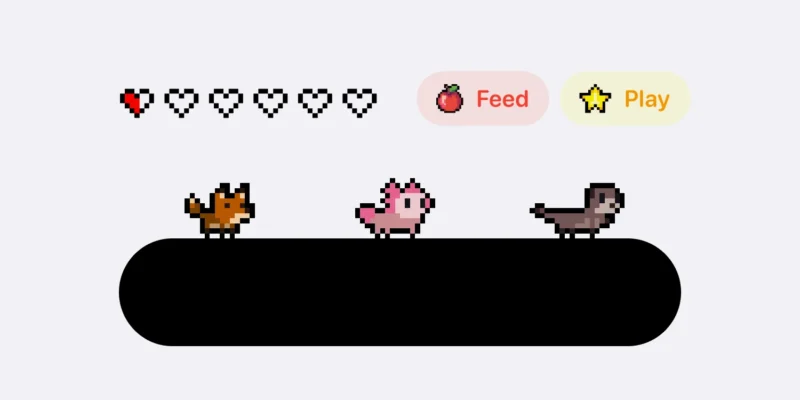
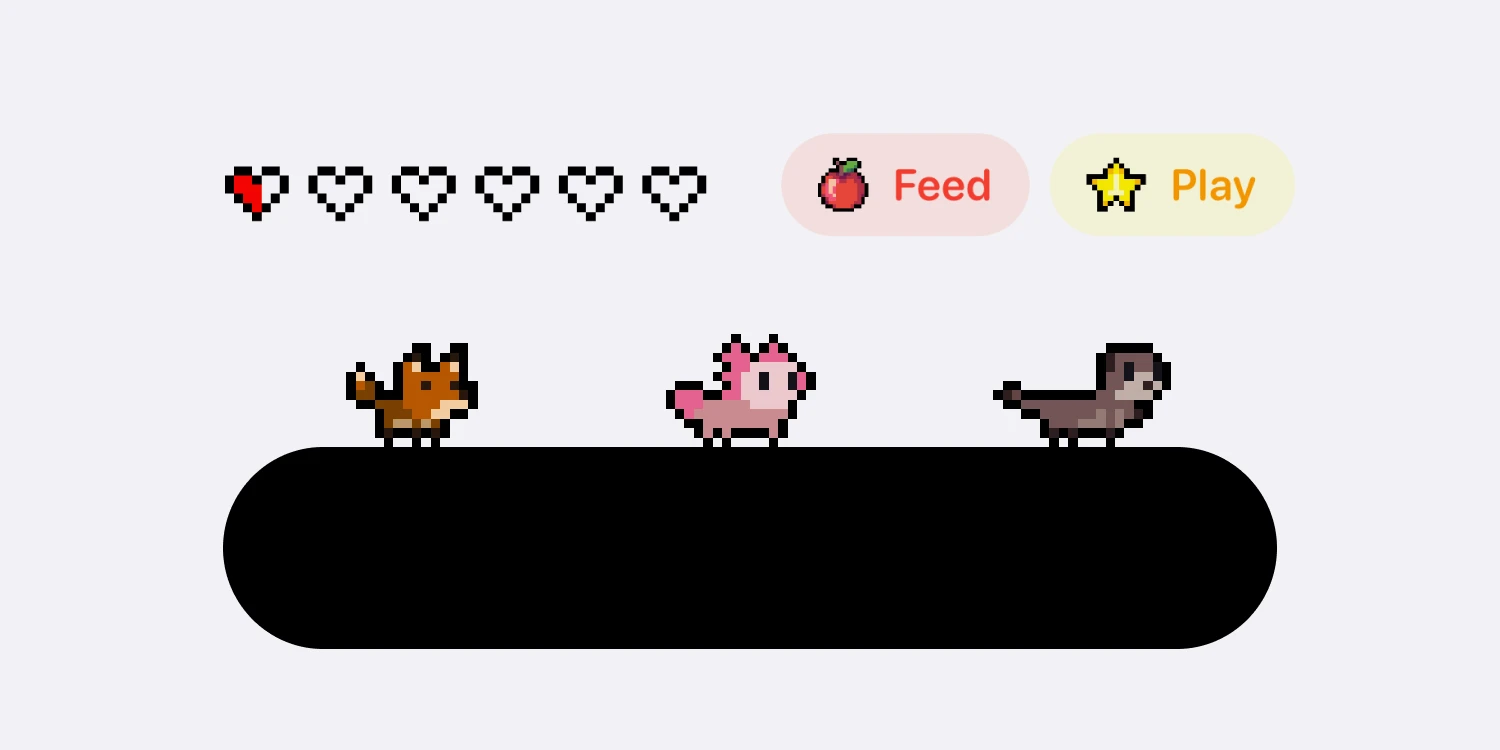



无需复杂开发!3 步快速实现响应式灵动岛动态效果,完美适配 WordPress 网站 / 纯静态网页,支持主题更新不失效,一键提升网站视觉质感与用户交互体验。
![图片[1]-网站灵动岛动态效果代码|响应式美化标题交互特效-微生之最](https://cos.swszz.cn/2026/01/20260117201944142-1024x182.webp)
![图片[2]-网站灵动岛动态效果代码|响应式美化标题交互特效-微生之最](https://cos.swszz.cn/2026/01/20260117202037514-1024x229.webp)
核心优势
「零技术门槛」:纯复制粘贴即可使用,无需编程基础,新手小白也能快速上手
「主题更新兼容」:免修改核心文件,彻底避免主题更新后灵动岛效果丢失
「全场景自动适配」:自动识别网站首页、文章页、分类页、用户中心,自定义展示差异化文案
「高级动态交互」:支持悬停放大、音频波动动画、平滑显隐过渡,大幅提升用户停留时长
「全设备响应式」:完美适配 PC 端 / 移动端,自动宽度适配不破坏网站原有排版
「SEO 友好优化」:支持自定义关键词文案,提升页面相关性,助力搜索引擎快速收录
第一步:添加灵动岛 CSS 样式(自定义 CSS 区域)
/* 动态灵动岛美化样式代码*/
.dynamic-island {
    position: fixed;
    top: 80px;
    left: 50%;
    transform: translateX(-50%) scale(0);
    transform-origin: center;
    width: auto; /* 自动宽度 */
    max-width: 80%; /* 最大宽度限制 */
    height: 40px;
    background-color: #000;
    border-radius: 25px;
    color: white;
    display: flex;
    align-items: center;
    justify-content: space-between;
    transition: transform 0.4s ease-in-out, height 0.6s ease-in-out, border-radius 0.6s ease-in-out, box-shadow 0.5s ease-in-out, opacity 0.5s ease-in-out;
    overflow: visible;
    z-index: 1000;
    padding-left: 35px;
    padding-right: 20px;
    opacity: 0;
    box-shadow: 0 0px 10px rgba(0, 0, 0, 0.45);
    flex: 1; /* 使宽度自动扩展 */
    white-space: nowrap; /* 防止文字换行 */
}

.dynamic-island.active {
    transform: translateX(-50%) scale(1);
    opacity: 1;
}

.dynamic-island.inactive {
    transform: translateX(-50%) scale(0);
    opacity: 0;
}

.island-content {
    opacity: 0;
    transition: opacity 0.9s ease-in-out, filter 0.8s ease-in-out;
    font-weight: bold;
    flex-grow: 1;
    text-align: left; /* 文字左对齐 */
    margin-left: 10px; /* 与图片留出空间 */
    overflow: hidden; /* 防止溢出 */
    text-overflow: ellipsis; /* 溢出显示省略号 */
}

.dynamic-island.active .island-content {
    opacity: 1;
}

.dynamic-island img {
    position: absolute;
    left: 5px; /* 调整图片位置 */
    width: 20px;
    height: 20px;
    object-fit: cover;
    transition: height 0.8s ease-in-out, width 0.8s ease-in-out, filter 0.8s ease-in-out;
}

.dynamic-island:hover {
    height: 60px;
    border-radius: 50px;
}

.dynamic-island:hover img {
    width: 30px;
    height: 30px;
}

.bars {
    display: flex;
    align-items: center;
    justify-content: flex-end;
    gap: 3px;
    min-width: 40px; /* 最小宽度限制 */
}

.bar {
    width: 2px;
    height: 13px;
    background-color: green;
    animation: bounce 1s infinite ease-in-out;
    animation-direction: alternate;
}

.bar:nth-child(1) {
    animation-duration: 1s;
}

.bar:nth-child(2) {
    animation-duration: 0.9s;
}

.bar:nth-child(3) {
    animation-duration: 0.8s;
}

.bar:nth-child(4) {
    animation-duration: 0.7s;
}

.bar:nth-child(5) {
    animation-duration: 0.6s;
}

.bar:nth-child(6) {
    animation-duration: 0.9s;
}

.bar:nth-child(7) {
    animation-duration: 0.7s;
}

@keyframes bounce {
    0% {
        transform: scaleY(0.3);
        background-color: green;
    }
    50% {
        transform: scaleY(1);
        background-color: orange;
    }
    100% {
        transform: scaleY(0.3);
        background-color: green;
    }
}
/* 动态灵动岛美化样式代码 结束*/
第二步:添加灵动岛 HTML 结构(头部 HTML)
<!-- 动态灵动岛美化样式代码 开始 !-->
<div class="dynamic-island inactive" id="dynamicIsland" style="opacity: 0;">

    <img src="https://cos.swszz.cn/2026/01/20260117184144649.webp" alt="通知图标" width="30" height="30">

    <div class="island-content">

        <div class="bars" style="line-height: 50px; margin: 0;">

            <p style="line-height: 50px; margin: 0; font-size: 12px; padding-right: 10px; overflow: hidden; white-space: nowrap; text-overflow: ellipsis;"> 欢迎访问微生之最</p>

            <div class="bar"></div>

            <div class="bar"></div>

            <div class="bar"></div>

            <div class="bar"></div>

            <div class="bar"></div>

            <div class="bar"></div>

            <div class="bar"></div>

        </div>

    </div>

</div>
<!-- 动态灵动岛美化样式代码 结束 !-->
第三步:动态逻辑代码(无格式错误版)
方案 A:WordPress 用户
// 灵动岛通知 开始
function add_dynamic_island_script() {
  ?>
      <script type="text/javascript">
          window.onload = function() {
    // 触发灵动岛的显示
    triggerIsland();
    // 获取当前页面的标题
    let title;
    const currentUrl = window.location.pathname;
    // 获取当前 URL 路径
    if (currentUrl.includes('/message/')) {
      // 如果访问了消息页面
      document.querySelector('.bars p').innerText = "正在访问消息页面";
    } else if (currentUrl.includes('/user/')) {
      // 如果访问了用户中心页面
      document.querySelector('.bars p').innerText = "欢迎来到用户中心";
    } else if (document.body.classList.contains('home') || document.body.classList.contains('front-page')) {
      // 如果是首页
      document.querySelector('.bars p').innerText = "欢迎来到<a target="_blank" href="https://yinhenote.cn/tag/%e9%93%b6%e6%b2%b3%e7%ac%94%e8%ae%b0/" title="View all posts in 银河笔记">银河笔记</a>";
    } else if (document.body.classList.contains('single')) {
      // 如果是单篇文章
      title = "<?php echo addslashes(html_entity_decode(get_the_title())); ?>";
      // 获取文章标题并解码
      document.querySelector('.bars p').innerText = "正在访问:" + title;
    } else if (document.body.classList.contains('category')) {
      // 如果是分类页面
      const category = "<?php echo addslashes(html_entity_decode(get_queried_object()->name)); ?>";
      // 获取当前分类的名称
      document.querySelector('.bars p').innerText = "正在访问:" + category + " 分类";
    } else if (document.body.classList.contains('page')) {
      // 如果是单个页面
      title = "<?php echo addslashes(html_entity_decode(get_the_title())); ?>";
      // 获取页面标题并解码
      document.querySelector('.bars p').innerText = "正在访问:" + title;
    } else {
      // 如果以上都不匹配,可以使用默认值
      document.querySelector('.bars p').innerText = "欢迎来到银河笔记";
    }
  }
  ;
  // 触发灵动岛的显示
  function triggerIsland() {
    const island = document.getElementById('dynamicIsland');
    if (island) {
      island.style.opacity = 1;
      island.classList.add('active')
                      island.classList.remove('inactive');
      // 在4秒后触发关闭动画
      setTimeout(() => {
        closeIsland();
      }
      , 4000);
    }
  }
  function closeIsland() {
    const island = document.getElementById('dynamicIsland')
                if (island) {
      island.classList.remove('active');
      island.classList.add('inactive');
      setTimeout(() => {
        island.style.opacity = 0;
        // 使灵动岛透明
      }
      , 600);
      // 与 transform 动画持续时间一致
    }
  }
  </script>
      <?php
}
add_action('wp_head', 'add_dynamic_island_script');
// 灵动岛 结束
方案 B:静态网页 用户

© 版权声明
版权保护声明
尊重原创,保护知识产权
原创保护:本站所有原创内容均受著作权法保护,未经许可禁止转载或商业使用
转载规范:如需转载,请注明出处并保留原文链接,不得删改内容
免责声明:本站仅提供学习交流平台,内容观点不代表本站立场
侵权处理:如发现侵权内容,请及时联系我们,将在第一时间处理
THE END











暂无评论内容